An IPTV trial is the smartest way to choose a service. In 30 minutes, you can find out more than any review or advert will tell you: how the picture looks on your own TV, how fast channels switch, whether the stream holds up during live sport, and how quickly support replies. The catch is that 30 minutes goes fast. This guide gives you a simple plan so you test the right things, in the right order, and make a confident decision.
What is an IPTV trial?
An IPTV trial is a short, free login that gives you access to the full service for a limited time. With IPTV Ireland, it lasts 30 minutes and includes the same channels, films, series and TV guide as a paid IPTV Sub. Nothing is held back, so what you see in the trial is exactly what you get when you subscribe.
Before your IPTV trial starts
Preparation is the difference between a useful trial and a wasted one. Before you ask for your login:
- Pick your main device. Test on the TV you will actually watch on, not just your phone.
- Install the player app first. Our IPTV Sub setup guide shows you how on every device, so your 30 minutes are spent watching, not installing.
- Choose a busy time. Weekday evenings and weekend afternoons are when servers are under most pressure. If a service is smooth then, it will be smooth any time.
- Make a short list of the channels, sport and shows you care about, so you can check them quickly.
- Use your normal connection. Test on the same Wi-Fi or cable you will use every day.
Your 30-minute IPTV trial plan
Follow this plan and you will cover everything that matters.
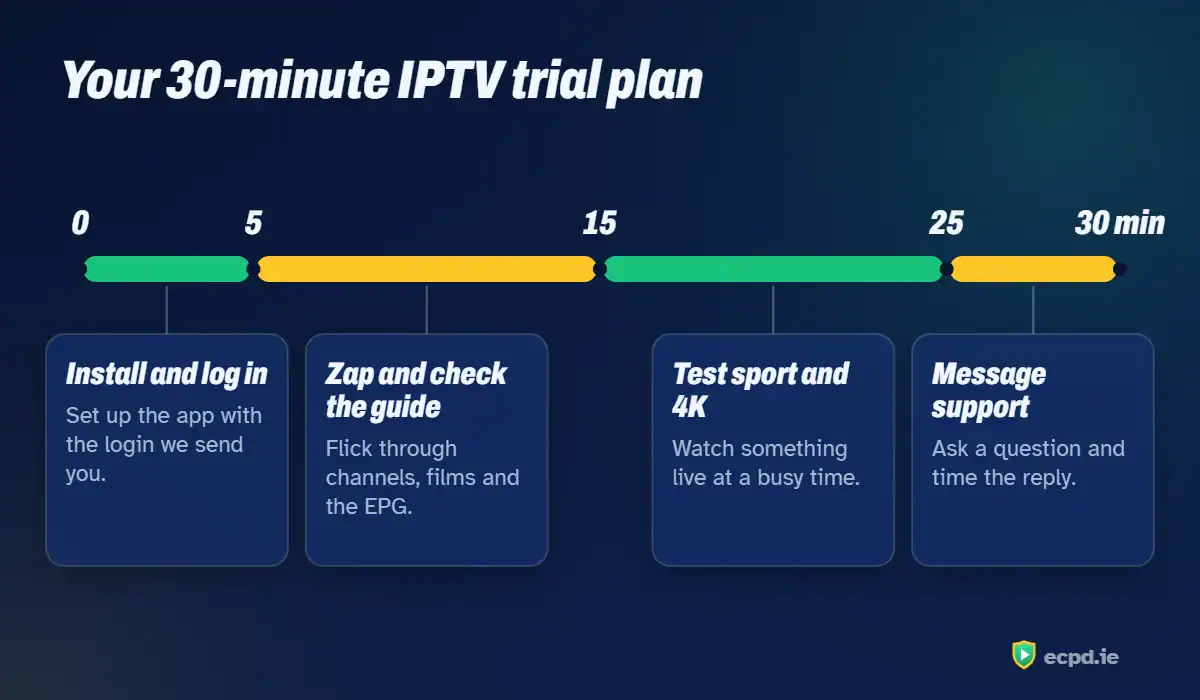
Minutes 0 to 5: install and log in
Enter the login we send you on WhatsApp. Note how long the channel list and TV guide take to load. A good service is ready in under a minute.
Minutes 5 to 15: zap channels and check the guide
Flick through ten or fifteen channels, including your Irish and UK favourites. Channels should open in a couple of seconds. Open the TV guide (EPG) and check that it matches what is actually on screen. Then try a film or a series from the on-demand library.
Minutes 15 to 25: test sport and 4K
This is the most important part of any IPTV trial. Watch something live, ideally a match, for at least five minutes. Look for freezing, blurring during fast movement and sound that drifts out of sync. If your broadband is 25 Mbps or more, open a 4K channel on your biggest screen and see how sharp it looks.
Minutes 25 to 30: message support
Send the support team a simple question on WhatsApp, such as which app is best for your TV. Time the reply. If you are going to pay for a service, you want to know someone will be there when you need them.
How to score your IPTV trial
Give each part of the test a score out of five as you go. It makes the decision far easier, especially if you are comparing more than one provider.
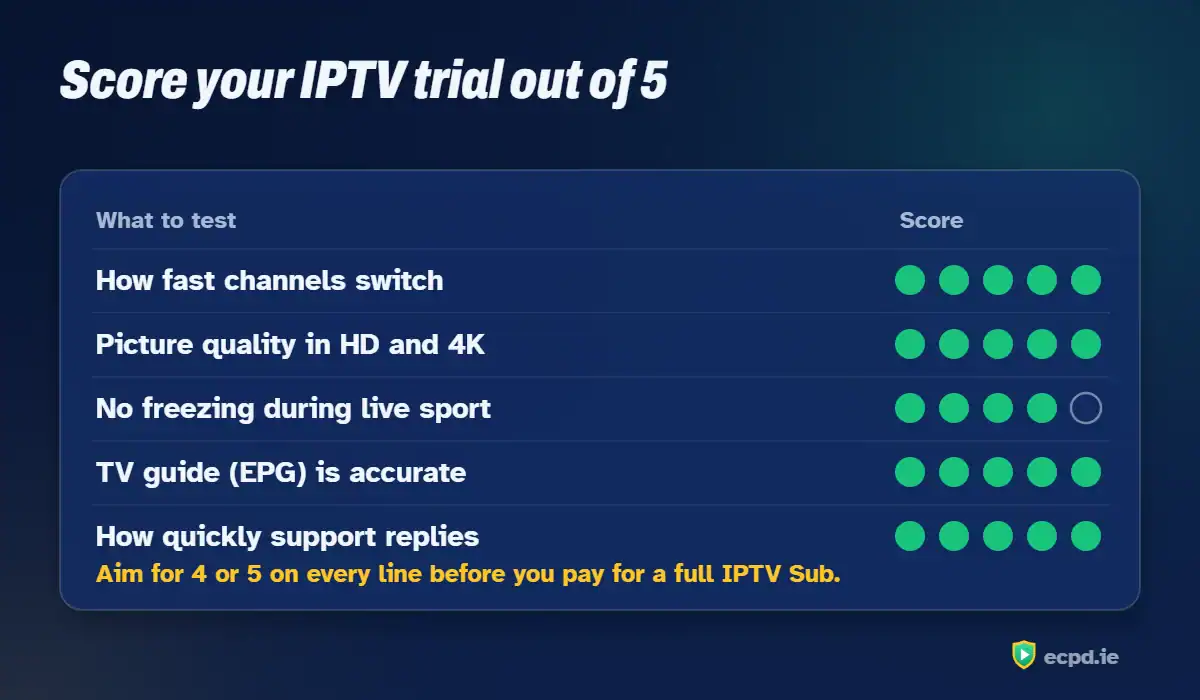
Aim for four or five on every line. A low score on freezing during live sport is the biggest warning sign, because that is exactly where cheap services struggle.
Testing on more than one device
If you plan to watch in different rooms, use a few minutes of your IPTV trial to check a second screen. Close the app on the TV first, because one IPTV Sub plays on one screen at a time, then open it on your phone or tablet. Check that the channel list and TV guide look the same. If you travel a lot, try it on mobile data too, so you know how it behaves away from home.
Warning signs during an IPTV trial
Walk away if you notice any of these:
- Channels take more than five seconds to open, or many don’t open at all.
- The picture freezes or drops to a blurry low quality during live sport.
- The TV guide is empty or shows the wrong programmes.
- Support takes hours to reply, or never replies.
- You are pushed to pay before the trial ends.
If you do see some buffering, check your own connection too. Our guide to fast IPTV without buffering helps you work out whether the problem is your Wi-Fi or the service.
How to get a free IPTV trial from IPTV Ireland
Getting your trial takes less than a minute:
- Tap the button below, or request it on our subscription page.
- Tell us which device you are using, for example a Firestick, a Samsung TV or an iPhone.
- We send your trial login on WhatsApp, along with the best app for your device.
- Follow the 30-minute plan above and decide at your own pace.
Start your free 30-minute trial
Message us on WhatsApp with your device and we will send your trial login straight away. No payment needed.
Trial and refund policy: why you need both
A trial shows you how the service performs today. A refund policy protects you if something changes after you pay. The best providers offer both. At IPTV Ireland, you get a free 30-minute IPTV trial before you buy and a 14-day refund policy after you buy, explained in our Terms & Conditions. Together, they mean you never have to take a leap of faith with your money.
After your IPTV trial: choosing a plan
Happy with what you saw? Every plan includes the same features as your trial, so the only question is how long you want. The 12-month plan is our most popular at €49.99, which works out at €4.17 a month. You can compare all four options in our IPTV subscription prices guide. Not convinced yet? Use our checklist on how to choose the best IPTV provider to compare us with anyone else.
IPTV trial FAQ
Is the IPTV trial really free?
Yes. The 30-minute trial costs nothing and you don’t need to pay anything to start it.
Is the trial the same as the paid service?
Yes. You get the same channels, films, series, TV guide and picture quality as a paid IPTV Sub.
Can I take the IPTV trial on a Firestick?
Yes. The trial works on Firestick, Smart TVs, Android boxes, phones, tablets and laptops.
What if the trial runs out before I finish testing?
Message us on WhatsApp. We are happy to answer any questions you still have before you choose a plan.
Why only 30 minutes?
Thirty minutes is enough to test everything that matters if you follow the plan above, and it keeps our servers fast for paying customers.
The bottom line
A good IPTV trial tells you more than any review. Prepare your device, test at a busy time, focus on live sport and support, and score as you go. If a service passes every test on your own TV, you have found a keeper. When you’re ready, your free IPTV trial is one WhatsApp message away.